
Dark terminal command center with agent panels, timelines, and diff-like surfaces.

Terminal-native agent orchestration

Atelier

Run one prompt in a local repo and let the harness route the work through the right agents. You keep the terminal, the history, the approvals, and the final call.

Built for developers who already live in a terminal and want agents to work inside the repo boundary, not around it.

5
runtime paths
8
agent profiles
1
active run

Why it exists

Agent work needs a control plane.

Atelier treats agent activity as a run with routing, scopes, results, and evidence. The runtime can think and stream. The harness owns file edits, shell commands, approvals, limits, and the durable record.
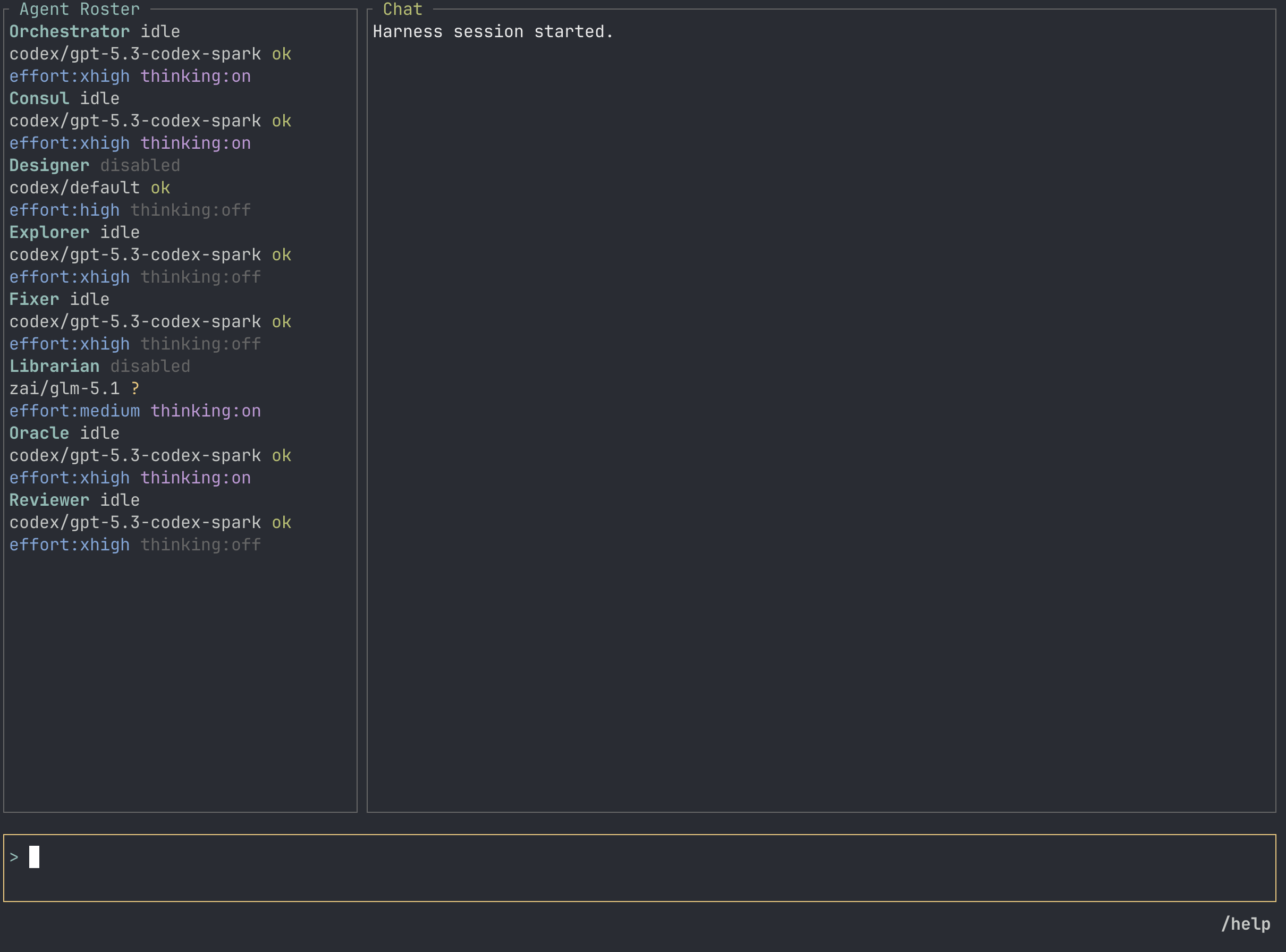
Atelier TUI showing the agent roster, chat panel, and prompt composer.

Feature Map

Everything Atelier is already shaped to do.

The site is pulling from the current README and project docs. That means the boring but important pieces are here too: config, distribution, history, limits, and tests.

One prompt stays one run.

Run Orchestration

  • Orchestrator-owned run plans
  • Explorer, Oracle, Fixer, Reviewer, Consul, Librarian, and Designer profiles
  • Clarifying questions when scope is not safe enough
  • Serial council for high-risk architecture, security, and review calls
  • Parallel step groups for disjoint file scopes
  • Run, step, command, and review-fix limits

A working TUI, not a detached log.

Terminal Interface

  • Chat for routing decisions, actions, diffs, diagnostics, and final results
  • Agent Roster with model, runtime, availability, and active step
  • Input Composer for prompts, answers, and interrupts
  • Live runtime stream snippets while an agent is working
  • Follow mode that respects manual scrolling
  • Slash commands for goals, config, subtasks, agents, and skills

Use the CLIs and credentials you already have.

Runtime Choices

  • Codex CLI runtime with Codex-owned login
  • Claude CLI runtime with Claude-owned login
  • Cursor Agent CLI runtime with Cursor-owned login
  • Z.ai HTTP runtime through an environment credential reference
  • Fake runtime for deterministic tests
  • Per-agent model assignments and fallback chains

The harness owns the actions.

Control Plane

  • Capability enforcement for read, edit, command, verify, and review work
  • Action approval for high-impact operations
  • Tool allowlists for narrower agent profiles
  • Credential references instead of secrets in config
  • Redacted TOML output from print-config
  • VCS actions only when explicitly requested

Every run leaves useful evidence behind.

Project Memory

  • Session events under .multiagent/sessions
  • Artifacts for large output, diffs, and run material
  • Run records under .multiagent/runs
  • Context resume from harness-owned history
  • Clean-session command for local history cleanup
  • Codemap state for repository orientation

Install once, run where the work is.

Distribution

  • Global npm package at @matheusbbarni/atelier
  • Prebuilt native platform binary packages
  • macOS, glibc Linux, and Windows arm64/x64 targets
  • GitHub Release archives and checksum manifests
  • Cargo install path for source builds
  • atelier --update through the npm launcher

How a run moves

The loop is explicit.

No hidden handoff between agents. Each result comes back to the Orchestrator, and the next step is a decision the harness can show, persist, and bound.

  1. 01

    Prompt

    You type the work once. Atelier starts one run and records it.

  2. 02

    Route

    The Orchestrator chooses a single agent, a council, or a parallel group.

  3. 03

    Act

    Agents ask the harness for reads, edits, commands, approvals, and verification.

  4. 04

    Review

    Reviewer findings go back to the Orchestrator instead of editing directly.

  5. 05

    Record

    History, artifacts, diffs, diagnostics, and run results stay under .multiagent.

Layered dark interface showing parallel agent activity and review panes.

Runtimes

Bring the agents you actually use.

Codex, Claude, and Cursor run through their local CLIs and login state. Z.ai uses an API-key environment reference. The fake runtime keeps tests deterministic. Atelier keeps those paths separate so config stays readable and credentials stay out of project files.

Product Views

Four views of the same control loop.

The UI is not trying to hide the work. These real TUI states show the run surface, pickers, and command reference inside the product.

Atelier TUI with agent roster, empty chat pane, and prompt composer.

Run Surface

Agents, chat, and the prompt composer stay visible in one terminal workspace.
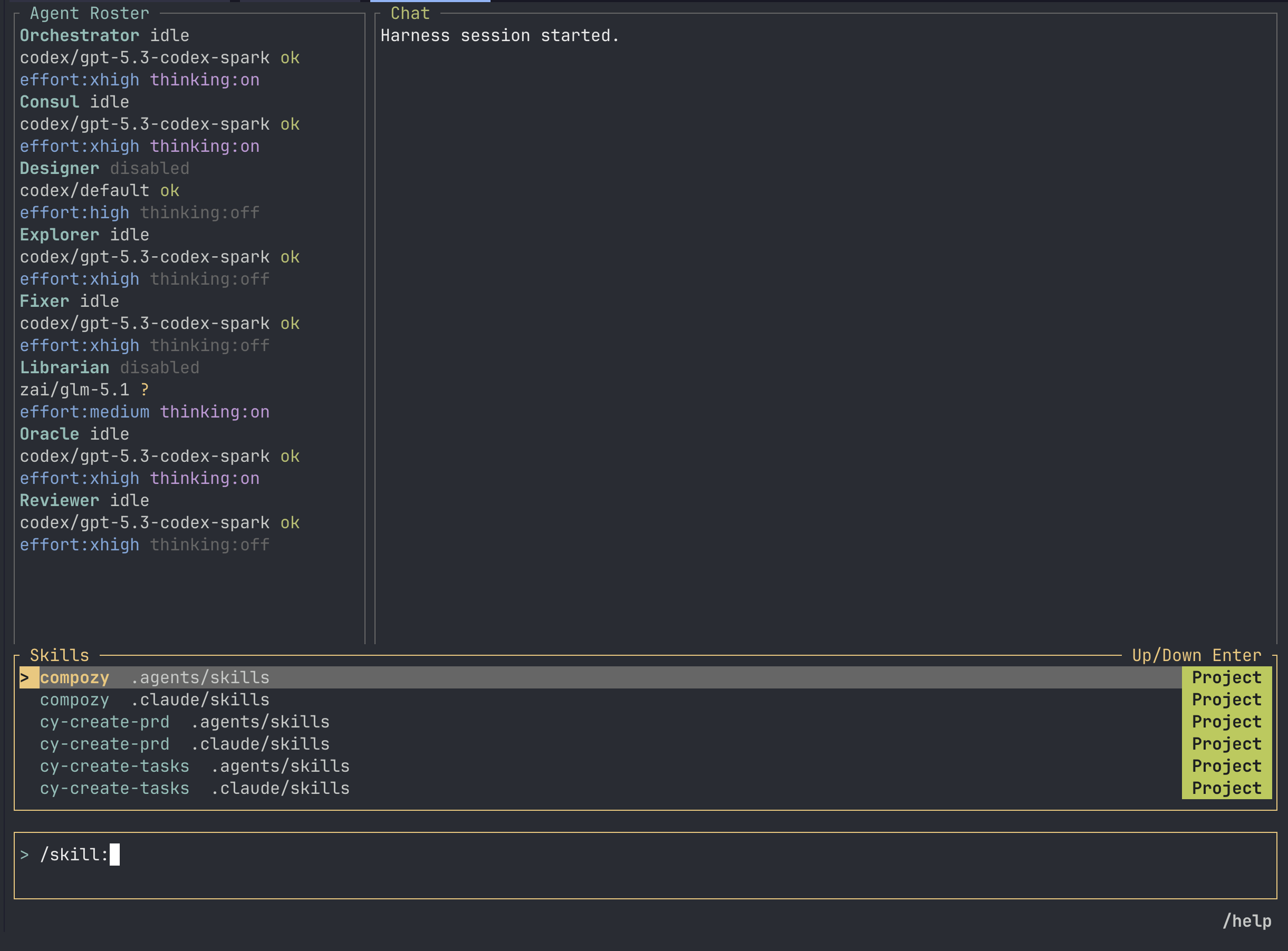
Atelier TUI showing the skill picker for project and personal skills.

Skill Picker

/skill: opens cached project and personal skills without leaving the run.
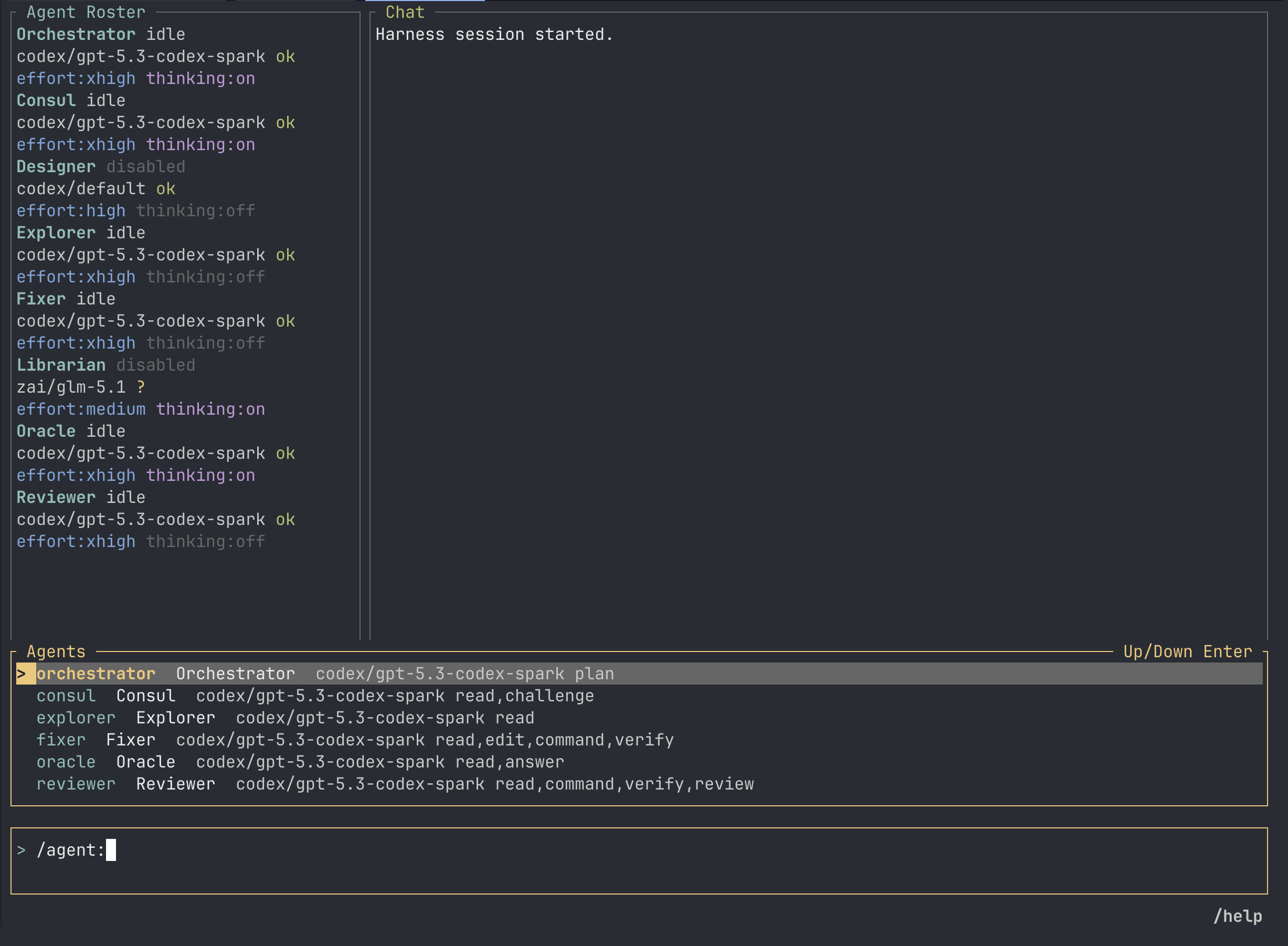
Atelier TUI showing the agent picker with runtimes and capability sets.

Agent Picker

/agent: shows enabled agent profiles, runtimes, and capability sets before routing work.
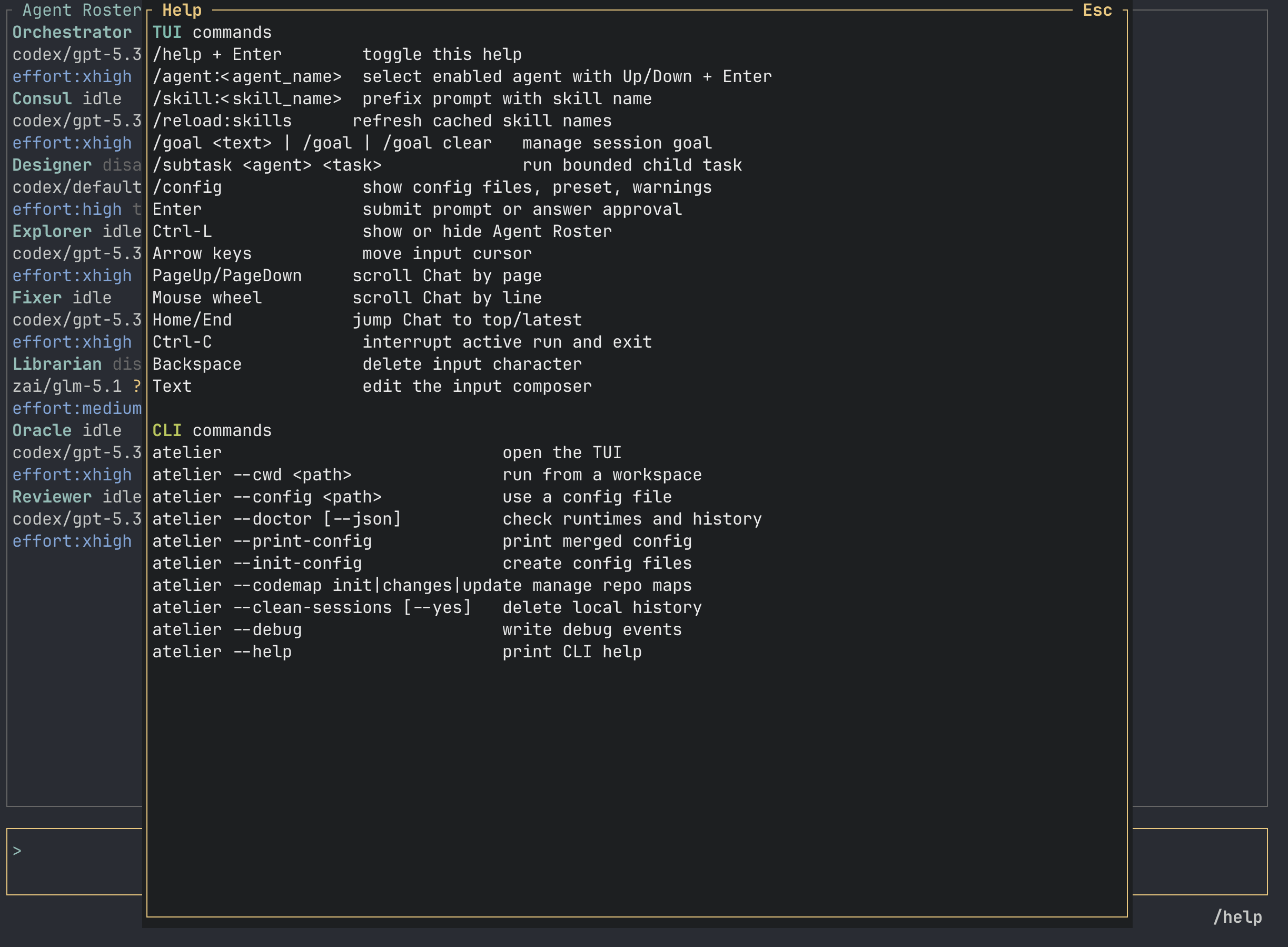
Atelier TUI showing the help overlay with TUI and CLI commands.

Help Overlay

/help keeps TUI and CLI commands available while the session stays underneath.

Command Surface

The flags are part of the product.

The CLI is intentionally small. You can open the TUI, inspect setup, print config, manage codemaps, clean history, and update the npm install without learning a second tool.

CLI

atelier
Open the TUI in the current working directory.
atelier --cwd <path>
Start from a selected working directory.
atelier --config <path>
Use a specific harness configuration file.
atelier --doctor
Check runtime setup before work starts.
atelier --doctor --json
Emit doctor output for scripts and CI.
atelier --print-config
Print the merged config with secrets redacted.
atelier --init-config
Create starter config and instruction files.
atelier --codemap init
Write folder-level codemap docs and state.
atelier --codemap changes
Report stale codemaps without writing.
atelier --codemap update
Regenerate stale codemaps and refresh state.
atelier --clean-sessions
Delete project-local session history after confirmation.
atelier --clean-sessions --yes
Clean project-local history without a prompt.
atelier --update
Update the global npm install.
atelier --debug
Launch with extra diagnostics.

TUI

/goal <text>
Set the active session goal.
/goal
Show the current goal.
/goal clear
Clear the active goal.
/config
Show active config files, preset, and warnings.
/subtask <agent> <task>
Run a bounded child task through one enabled agent.
/agent:<name>
Route a prompt to a selected agent profile.
/skill:<name>
Prefix a prompt with a cached project or personal skill.
/reload:skills
Refresh cached skill names.

Install

Start with npm. Build from source when you need to.

The npm package installs a prebuilt native binary and leaves your home config alone. Run doctor first, then open Atelier in the repo you want agents to work on.

npm install -g @matheusbbarni/atelier
atelier --doctor
atelier

Source build: cargo install --path .